Kerf and clearance: getting press-fit laser-cut joints right
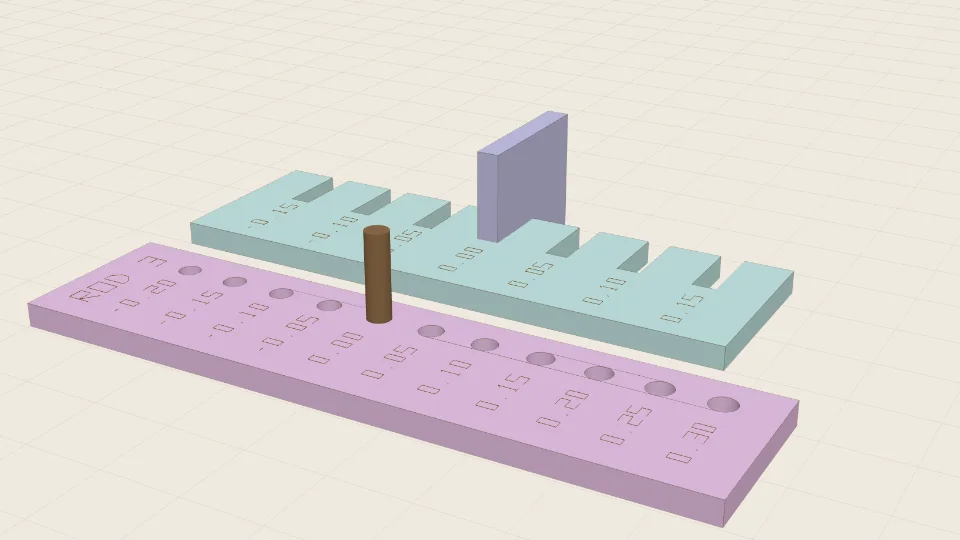
Almost every "my laser-cut parts don't fit" problem is one of two numbers: kerf and clearance. They are different things and they get mixed up.
Kerf: the material the beam removes
The laser doesn't cut along an infinitely thin line; it burns away a strip, typically a fraction of a millimetre wide, depending on the machine, focus, power, speed and material. That strip is the kerf. Cut a 10 mm tab and 10 mm slot along their outlines and the tab comes out about one kerf too small and the slot about one kerf too big. The joint is loose by two kerfs' worth.
Compensation means offsetting each line by half the kerf so the finished part has the size you drew: outside outlines grow, holes shrink. Do it once, at export, not by editing every dimension.
Clearance: the gap you choose
Even with perfect kerf compensation, a zero-gap joint is a press fit that may need a mallet, and in plywood that can split. Clearance is the deliberate difference you add: a few hundredths of a millimetre for a snug friction fit, more for a joint that must move (an axle in a hole, a hinge pin).
- Snug press fit (structural joints): small clearance, or none.
- Sliding fit (parts that move, rods in holes): more.
- Glued joints: a little loose is fine; glue fills the gap.
(Exact values depend on your machine and material: this is why you measure rather than copy someone else's.)
Why not just copy a number from a forum?
Because kerf changes with lens, focus height, speed, power, air assist, and the specific batch of plywood or acrylic. Plywood thickness also varies: "3 mm" can easily measure 2.8 to 3.2 mm. Measure your own sheet with calipers.
A five-minute fit test
- Measure the actual thickness of your sheet with calipers.
- Open the Fit test generator and enter that thickness. It creates a comb of slots with graded widths and a strip of rod holes.
- Cut it in the material and at the settings you will use for the real project.
- Slide a scrap of the same sheet into the comb. Pick the slot that holds snugly without force; test your rod in the holes.
- Enter the matching kerf/clearance values and generate your project.
Cut one test per material and re-run it if you change lens, settings or sheet supplier.
Checking the design too
A good fit on the bench doesn't help if two parts of the design overlap. laserpuzzle's generators check the assembled model for overlaps, at rest and across the moving range of joints, and show the pose where a clash happens, so the only thing left to tune is the number your fit test gave you.
Open the Fit test generator · How laserpuzzle compares with other tools